Apple Hot News

iPhone News and Reviews

Wednesday, July 23, 2008

iPhone Hacks By Oreilly


Collaborate. Contribute. Develop.

Join iPhone Hacks and gain advanced access to hacks, tips, and tricks to make your iPhone experience even better. You'll learn how to do things to your iPhone that would surprise even Apple engineers! Members of this community site can make comments, participate in the forums, and help author the book by submitting their own hacks. Start your 30-day free trial now!

Chapter 1: Get To Know Your iPhone

Hack 1.01: Master Your iPhone's Settings

Hack 1.02: Get Better Wireless Web Performance on your iPhone

Hack 1.03: Seamlessly Connect Your iPhone or iPod Touch to Wi-Fi

Hack 1.04: Browse the Web Well

Hack 1.05: Sync More Than Music With iTunes

Hack 1.06: Back Up Your iPhone's Files

Hack 1.07: Maximize iPhone and iPod Touch Battery Life


Chapter 2: Basic Hacking


Chapter 2: Basic Hacking

Hack 2.01: Know Your Terms

Hack 2.02: Know Your Firmware Version

Hack 2.03: Open your iPhone or iPod Touch to Customization with Jailbreaking

Hack 2.04: Install Third-Party Apps Right From Your iPhone or iPod Touch Using Installer.app

Hack 2.05: Install Third Party Applications Using .PXL Packages

Hack 2.06: Install Third-Party Apps with Your Browser

Hack 2.07: Use Your Computer to Access Your File Directory

Hack 2.08: Understand File Addresses While Browsing Your iPhone's File Directory

Hack 2.09: Browse Your iPhone's File System Without a Computer


Chapter 3: Troubleshoot Your iPhone or iPod Touch

Hack 3.02: Getting Support for Unsupported Hacks

Hack 3.03: Learn to Drive your iPhone - Back in Time

Hack 3.04: Enter Restore Mode

Hack 3.05: Enter DFU Mode

Hack 3.06: Fix 3rd Party Apps That Keep Crashing

Hack 3.07: Restore your iPhone

Hack 3.08: Downgrade your Firmware

Hack 3.09: Downgrade your iPhone Baseband

Hack 3.10: Downgrade your iPhone's Bootloader

Chapter 4: Communication

Hack 4.01: Use Your iPhone to Manage All Of your Email Accounts

Hack 4.02: Copy Contacts From A SIM Card To Your iPhone

Hack 4.03: Unleash the Full Power of SMS and MMS

Hack 4.04: Increase The Duration Of Your iPhone's SMS Alert

Hack 4.05: Use Instant Messaging on Your iPhone

Hack 4.06: Use IRC on your iPhone

Hack 4.07: Transfer Documents to your iPhone without Jailbreaking

Hack 4.08: Send email from your laptop through your iPhone without Jailbreaking

Hack 4.09: Use Voice-over-IP On Your iPod Touch

Chapter 5: Media and Data

Hack 5.01: Watch Web Videos in Safari Browser

Hack 5.02: Convert Videos to iPhone- and iPod Touch-ready Formats

Hack 5.03: Watch DVDs on your iPhone

Hack 5.04: Sync Music And Videos From Multiple Computers To Your iPhone

Hack 5.05: Upload Images to the Web using Email

Hack 5.06: Upload Images to the Web with a Native App

Hack 5.07: Upload and Download Files With Your iPhone

Hack 5.08: View Unsupported Media Using Email

Hack 5.09: View Any Media on your iPhone with Mobile Preview

Hack 5.10: View RSS feeds on your iPhone

Hack 5.11: Read eBooks on your iPhone with the Books application

Hack 5.12: Expand Your Lexicon with a Built-in Dictionary on your iDevice

Hack 5.13: Take Screenshots on your iPhone

Hack 5.14: Stream Music and Videos From Your Computer to Your iPhone


Chapter 6: Games

Hack 6.01 Find ROM files for your game emulators

Hack 6.02 Download ROM files directly on your iPhone

Hack 6.03 Play Nintendo Games on your iPhone or iPod Touch

Hack 6.04 Play Super Nintendo Games on your iPhone or iPod Touch

Hack 6.05 Play Gameboy Advance Games on your iPhone or iPod Touch

Hack 6.06 Play Playstation 1 Games on your iPhone or iPod Touch


Chapter 9: Advanced Hacks

Hack 9.01: Control your Desktop or Laptop With Your iPhone's Browser

Hack 9.02: Control your Desktop or Laptop With An iPhone Application

Hack 9.03: Create More Room For 3rd Party Applications

Hack 9.04: Tether the iPhone's Edge Network to Your Laptop's Web Browser

Hack 9.05: Execute Terminal Commands on your iPhone

Hack 9.06: SSH On Your iPhone

Hack 9.07: AFP On Your iPhone

Hack 9.08: Install Samba On Your iPhone

Hack 9.09: Apache On Your iPhone

Hack 9.10: Easily Manage all the Network Services on your iPhone

Hack 9.11: Dual Boot With Multiple Firmware Versions

Hack 9.12: LoJack Your iPhone


Chapter 11: Unlocking and Activation

Hack 11.01: Understand The Cycles Of iPhone Unlocking

Hack 11.02: Virginize your iPhone

Hack 11.03: Activate Your iPhone Without a Subscription To Use WiFi and Other Features

Hack 11.04: Unlock your iPhone Via Software

Hack 11.05: Unlock your iPhone Via iphoneSimFree

Hack 11.06: Unlock your iPhone Using i3gSIM

Hack 11.07: Unlock Your iPhone By Making a SuperSIM Card

Hack 11.08: Unlock your iPhone with a Soldering Iron

Hack 11.09: Post-Unlock Steps to Get EDGE and YouTube Working


Chapter 13: Hardware

Hack 13.01: Remove Your SIM Card

Hack 13.02: Remove Your iPhone's Rear Panel

Hack 13.03: Remove The Headphone Jack From Your iPhone

Hack 13.04 Remove Your iPhone's Camera

Hack 13.05 Remove Your iPhone's Front Bezel

Hack 13.06 Remove Your iPhone's Logic and Communications Boards

Hack 13.07 Replace Your iPhone's Battery

Hack 13.08 Replace Your iPhone's Display Assembly

iPhone Tweaks

iPhone Tweaks

To do these, iPhone has to be unlocked and Installer app should be installed. All the instructions are for Firmware version 1.1.4.

  • Refresh the sources in installer app.
  • Go to Sources section and then install Community Sources.
  • Refresh the sources again.

To fix the caller ID problem:
Go to iClarified section and then install AppSupport Patch (1.1.4).
Reboot the iPhone.

To fix the file system access issue with ZiPhone and iBrikr
Add the source iphone.unlock.no to installer app.
Refresh the sources.
Go to Unlocking Tools section and then install ZiPhone iBrikr Fix.
Reboot the iPhone.

To disable the keyboard's auto-correction feature
Go to Tweaks section and then install Kb.
Reboot the iPhone.
An enable/disable setting will be added to the General -> Keyboard section in iPhone settings.

To fix the root password incorrect (su) issue in MobileTerminal
Source iphone.lenlolabs.com should be added to installer app sources.
Go to Tweaks section and install the BSD Subsystem 2.x SU... patch.
Reboot the iPhone.

Usefull Software Sources
iSMS: http://iphone.nonsoft.com/repo/
(A new section called Shawn Chain's Apps will be added to the installer)

MobileTerminal: iphone.lenlolabs.com
will be in System section)

iPhysics: http://iphone.r4m0n.net/repos

Usefull Software
Listed as found in the Installer app.

Dictionaries
Merriam Webster

Games
Chess
ContraSence
GemLogic
iCave
iSolitare
Labyrinth
Pool
SuperPong
Tris
Yeti3D

iClarified
Pysl
Safari Download Plugin

Multimedia
Camera Pro
Voice Notes

Productivity
Mobile Finder
Sketches
weDict

System
Categories
SummerBoard
Terminal
XLaunch

Toys
RealArtist

Utilities
Accelerometer Log
Capture
Customize
SysInfo
weTool

Secret iPhone OS 2.0 features and tips


We previously noted a method for taking screenshots under iPhone OS 20. James1292, a user on Apple’s discussion boards, subsequently found that the screenshot function can be manipulated using the zoom feature. Simply zoom to the desired depth then trigger a screenshot by pressing the Home and Sleep/Wake buttons simultaneously.

Mobile Safari Speaks Your Lingo

Mobile Safari can speak in many languages. Launch Settings then go to: General, Keyboard > International Keyboards and toggle the desire keyboards. Using the small “globe” icon on the left side of the spacebar, you can rotate through configured languages.

Once you have the keyboard of your choice displayed you can take advantage of a hidden feature in iPhone OS 2.0: simply press and hold the “.com” key. The iPhone will display the most common top level domains for your country. In the US/English: .net, .edu, .org, .com. In Germany: .edu, .org, .de, .com. In Spanish: .edu, .org, .es, .com.

In the mobile Mail.app, the same is true. If you press the “globe” for language selection, you can then press and hold the “.” (period) key to select the top level domain associated with you language settings at that time .

This feature is not consistent across all countries and in some cases some countries are not represented at all.

via http://www.iphoneatlas.com/2008/07/21/undocumented-iphone-os-20-features-and-tips/

iPhone 2.0 unlocked, iPhone 3G will hopefully follow soon

GSM Arena News

Last weekend saw the introduction of an unlock solution for the latest iPhone firmware. The first-gen iPhone users will now be able to enjoy 2.0 firmware with any SIM card. The iPhone 3G is not there yet, but there's some progress and we hope it would get unlocked some time soon too.

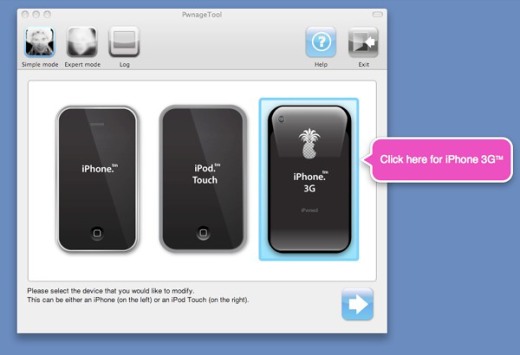
The popular iPhone Dev Team has come up with the latest version of their all-in-one Pwnage tool for setting your iPhones free via customized firmwares - much like the Windows Mobile community does it. However with the Pwnage Tool you can cook your own firmwares customized to your liking.

For those of you that are new to Pwning here's a brief and simplified explanation. You take an original iPhone firmware file (freely downloadable), you run it through the Pwnage tool customizing stuff on the way (such as pre-installed applications, setups, even custom graphics) and finally you apply it to the iPhone the regular iTunes way. It's that simple.

Pwnage Tool 2.0 - choose your device

The new Pwnage 2.0 tool now allows you to (h)activate, jailbreak and unlock the first-gen iPhone running the latest 2.0 software. It's a major upgrade to the iPhone functionality and actually makes the original iPhone software identical to the iPhone 3G.

The Pwnage tool 2.0 also works with iPhone 3G but unlocking is not possible yet. The only available options are (h)activation and jailbreak so you won't be taking advantage of the 3G or any other phone function unless you are using the legit SIM card provided with the iPhone 3G.

The Pwnage tool is immensely popular and it's being downloaded feverishly all weekend. Thanks to your feedback an upgraded version of the tool has spawned - it's ver. 2.0.1.

Unfortunately, for now the Pwnage tool 2.0 is available only to Mac, so to take advantage of it Windows users will need a workaround which requires even more hackery. In case you are interested, you can check the Windows solution here.

The official Dev Team blog is to be found here. A step-by-step guide for jailbreaking the iPhone 3G can be found here.

We should remind you that there are three countries that you can get the iPhone 3G fully unlocked - it's Italy, Belgium and Hong Kong. In Italy the iPhone 3G 8GB would set you back 399 euro (around 630 US dollars) but you will get the device with a pre-paid SIM and fully operational with other carriers.

In Belgium the same thing will cost you 525 euro (830 US dollars) for the 8GB version.

iPhone 2.0 unlocked

In Hong Kong the only way to buy the iPhone 3G is with a local ID and local credit card. Ingenious sellers there however have already started an iPhone 3G reselling service, but it's costly and the price for a single unlocked unit usually goes over 1000 US dollars.

Additionally, several carriers in other first-wave countries offer official unlocking of their iPhone 3G handsets, but it's usually costly - about 100 euro per device (160 US dollars). For a full list of the iPhone availability and SIM lock status per country, we suggest you visit this list.

Apple iPhone 3G unlocked already


Brazillian video claims to show first hacked handset

Written by Shaun Nichols in San Francisco

vnunet.com, 16 Jul 2008

* Have your say
* Send to a friend
* Share

A group from Brazil has managed to unlock Apple's iPhone 3G handset just days after its release.

The unlocked iPhone is displayed and demonstrated in an online video on a Portuguese-language news blog.

An unlocked iPhone can be used with any Sim card and service provider.

IPhone user Bruno MacMasi said in an interview with Gizmodo that the unlocking process involved modifying the Sim hardware so that the International Mobile Subscriber Identity can be overwritten and removed from the original network.

A similar process was used to unlock the original iPhone last year.

Separately, a group of researchers known as the iPhone Devteam has released the first 'jailbreak' software releases for the iPhone 3G and the iPhone 2.0 software update.

The 'jailbreak' term refers to the process of removing the software controls which prohibit users from installing software outside of the iPhone App Store.

The group, which has asked not to be linked to directly for bandwidth purposes, is currently offering a software utility which automatically performs the jailbreak process.

Unlocked and modified handsets have been an issue ever since Apple first released the iPhone. Users initially were eager to remove the strict controls over installing software and run the handset with other carriers.

While the iPhone App Store has allowed for the distribution of third-party applications, there remains a dedicated group of users wishing to run older third-party applications and software which have not been approved for the Store.

Apple has attempted to remain relatively neutral on the matter. The company said that, while the jailbreak processes will void the warranty and possibly cause damage to the phone when new updates are installed, no special efforts will be made to deliberately disable or 'brick' hacked iPhones.

iPhone 3G Unlocked with SIM Card Adapter [Deja Vu]

Just four days after its launch, the iPhone 3G has been unlocked for the first time exactly like the original iPhone: using a special card that piggybacks to your SIM card, fooling the phone into thinking it's using an official carrier. While this is not the software unlock being developed by the usual suspects, the video clearly shows that it works fine.

iPhone Magic - Have Fun

iPhone Unlock Demo

iPhone 3G and firmware 2.0 is released

The new iPhone and the 2.0 firmware has now been officially released. Since there's no way to unlock/activate it yet, do not upgrade until a solution for unlocking and activating this firmware is available. So hit cancel, and "do not notifiy me again" when iTunes prompts you to upgrade. The Dev Team claim to have a solution (for 1G phones), soon to be released.

Buy iPhone 3G - Best Deals

Buy iPhone 3G - Best Deals can be searched on this site : BuyIphone

Unlock Your iPhone with ZiPhone (Windows)

Jailbreak and unlock almost any iPhone instantly with ZiPhone!

No downgrading then upgrading! You can do the unlock from 1.1.2 or 1.1.3. It will also jailbreak and activate as well as install Installer.app for you!

Unlock and Imei changer will work ONLY on 4.6 BL (112 and 113 ootb).
- Jailbreak will work on any OS version.
- Activation will work on any OS version, except for youtube on 1.0.X.

Full instructions on iClarified

How to Unlock an iPhone, Three Different Ways

Picture_68UPDATE: One of the three methods described below ran into a legal roadblock on Saturday. See iPhone Unlock Hits Legal Hang-Up.

- - - - -

With uncanny serendipity, three teams trying to unlock Apple's (AAPL) iPhone so that it can work with carriers other than AT&T (T) have reached their goal within days of each other.

First out of the block was George Hotz, a 17-year-old student from New Jersey who posted a 10-step technique on his website Thursday that requires cracking open the iPhone and doing some tricky soldering.

His accomplishment was quickly overshadowed by a team from iPhoneSIMfree.com, which developed a software-only technique that does the same thing without having to void the iPhone's warranty by opening it up. The group demonstrated its procedure today to Engadget's Ryan Block, who vouches for its authenticity on the blog and in a video. (Note the "T-Mobile" in the upper left hand corner of his iPhone screen, pictured above.)

Now Infoworld is reporting that a third team, based in Belfast but drawing on the resources of programmers around world, has accomplished the same thing -- a software-only hack that will allow iPhone owners to run the device on any GSM-based SIM card. According to John McLaughlin, founder of Uniquephones, the software will be available for download tomorrow afternoon at www.iphoneunlocking.com for $25 to $50.

The iPhoneSimFree team says per unit and bulk licenses for its software will be available next week; no price has been set. Hotz says he has no plans to sell his hardware solution, although he has offered his iPhone, modified and autographed, for sale on eBay.

Neither Apple nor AT&T has commented on these developments, which came just shy of two months from the day the iPhone went on sale. AT&T may take comfort in the fact that most users won't bother trying to get around their 2-year service contract. Apple, for its part, could undo all these hacks with its next iPhone software upgrade.